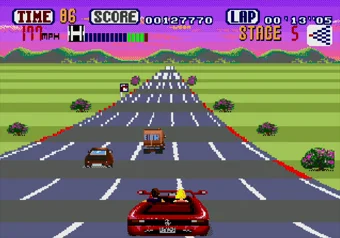
Every route through OutRun
The forks decide the whole run, and the game tells you nothing about where they lead. So here is the map. Fifteen stages laid out as a widening diamond, with five goals at the far end:
- Stage 1: Coconut Beach
- Stage 2: Gateway or Devil's Canyon
- Stage 3: Desert, Alps or Cloudy Mountain
- Stage 4: Wilderness, Old Capital, Wheat Field or Seaside Town
- Stage 5: Vineyard (goal A), Death Valley (B), Desolation Hill (C), Autobahn (D) or Lakeside (E)
Each fork only offers the two stages next to the one you are on, so your options close fast. Take Desert at stage 3 and goals D and E are already out of reach. Take Cloudy Mountain and you have given up A and B. Hold the same side at every fork and you ride the outer edge of the diamond straight to A or to E. The branches sort loosely into easier and harder roads, which is the only difficulty dial the course itself hands you.
No branch is a shortcut. Every area is exactly the same length, so what separates a fast route from a slow one is purely how much time its corners take out of you.
Two gears, and why flooring it fails
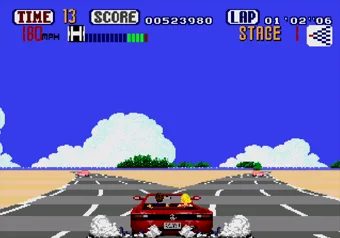
The Ferrari has a high gear and a low gear. High is faster and much twitchier, low is slower and holds its line. That is the whole transmission, and it decides your run.
The instinct on the first straight is to bury the accelerator and never touch the brake. That instinct loses. Tap the accelerator instead of holding it, drop into low before a bend rather than halfway through it, and drop into low again the moment you have crashed, when the car is crawling and high gear will only spin you into the next obstacle. In the last two stages a single crash usually ends the run outright, so the habit has to be in place well before you need it.
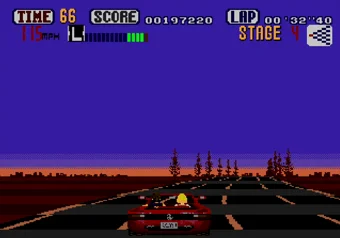
Seeing the bend coming is the other half of it. The camera sits at the height of a real driver's eyes, low and close to the tarmac, so crests and dips hide traffic until it is nearly in your lane. The roadside signs are the answer. They call the next turn before the road itself reveals it, and reading them is the difference between braking early and arriving sideways. Nothing ever drives toward you, so a lane change is only ever about the cars ahead.
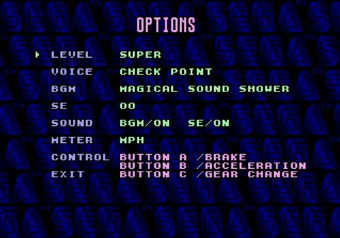
Here the accelerator is B, the brake is A and the gear change is C. If you would rather drive on different keys, rebind them on this page instead of touching the game's own CONTROL menu, which reassigns accelerator, brake and gear change to a different set of buttons and leaves every label here pointing at the wrong pedal.
Cheats & secrets
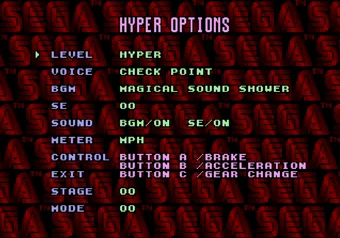
How to activate Hyper options
On the title screen, press Start, then tap out this sequence:
- A × 11 times.
- B × 3 times.
- C × 8 times.
Open the options now and the menu is titled HYPER OPTIONS instead of OPTIONS, which is how you know the code took. It carries two entries that were not there before: STAGE and MODE.
What do STAGE and MODE actually do?
STAGE is a checkpoint select. Left at 0 the game runs normally. Any other value drops you into one individual piece of the course, and the game resets once you finish the stage that piece belongs to. You can start anywhere, but only ever to the end of that stage, which makes it a practice tool rather than a way to skip ahead.
MODE takes a value from 0 to 15, and each bit switches on a separate effect. Add them together to combine:
- +1 turns off collision with cars and most other objects. Guard rails still stop you, and scenery still bleeds off speed without launching the car.
- +2 gives infinite time. The clock reaches zero and nothing happens.
- +4 puts debugging numbers on the HUD. The four-digit figure on the right counts the metres you have driven, and the three-digit figure in the middle drops from 128 to 0 when you leave the road, showing 999 on a collision if collisions are switched off.
- +8 appears to do nothing at all.
The useful setting is 2. Infinite time with collisions left on lets you learn a route properly, paying for every mistake in speed while nothing forces you to restart. Enter 3 if you would rather just look at the scenery, and 7 if you want the distance counter running while you do.
Hyper difficulty and the 215 MPH Ferrari
The game carries seven difficulty names: SUPER EASY, EASY, NORMAL, HARD, SUPER, PRO and HYPER. HYPER is not among the ones offered when you start. Earn it by finishing the game on Super or Pro, or take the short way and press C × 10 times on the title screen, then choose it in the Options menu.
Hyper raises the Ferrari's top speed to 215 MPH, which is enough to put a whole run under five minutes. It is less a difficulty setting than a different game. At that speed the crests arrive before you have finished reading the sign that warned you about them, and the low gear stops being a corner tool and becomes the only thing keeping you on the road.
There are no passwords, so save the fork
OutRun has no password system and no saving of its own. Close the tab halfway to Death Valley and the run is gone, along with whatever you had learned about the corners on the way there.
Playing it online here, the Save button covers the gap, and there is one trick worth building a session around. Save on the approach to a fork you have never taken. Drive it out to whichever goal it leads to, watch the ending, then Load and take the other branch from the same spot. That is how you collect all five endings without driving Coconut Beach twenty times to get there. The Load button shows the time the save was made, so you always know which run you are dropping back into.
One slot per game, though, so every Save overwrites the last one. Saves also live in this browser on this device, and clearing site data takes them with it.